
The following page provides helpful instructions for setting up an Arduino, Max6675, and thermocouple, to send temperature data to Artisan roasting software.
Program your Arduino with the following code
#include "max6675.h" //CHANGE QUOTES TO <>
#include "ModbusRtu.h" //CHANGE QUOTES TO <>

// data array for modbus network sharing
uint16_t au16data[16] = {
  0, 0, 0, 0, 0, 0, 0, 0, 0, 0, 0, 0, 0, 0, 1, -1 };

/**
 *  Modbus object declaration
 *  u8id : node id = 0 for master, = 1..247 for slave
 *  u8serno : serial port (use 0 for Serial)
 *  u8txenpin : 0 for RS-232 and USB-FTDI
 *               or any pin number > 1 for RS-485
 */
Modbus slave(1,0,0); // this is slave @1 and RS-232 or USB-FTDI


int thermoDO = 10;
int thermoCS = 9;
int thermoCLK = 8;

MAX6675 thermocouple(thermoCLK, thermoCS, thermoDO);
int vccPin = 7;
int gndPin = 6;


//int led = 13;

void setup() {
  //Serial.begin(19200);
  slave.begin(19200); // 19200 baud, 8-bits, none, 1-bit stop
  // use Arduino pins
  pinMode(vccPin, OUTPUT); digitalWrite(vccPin, HIGH);
  pinMode(gndPin, OUTPUT); digitalWrite(gndPin, LOW);
  //pinMode(led, OUTPUT);
 delay(500);

}

void loop() {
  // basic readout test, just print the current temp

   //Serial.print("C = ");
   //Serial.println(thermocouple.readCelsius());

   au16data[2] = (uint16_t) thermocouple.readCelsius()*100;

   slave.poll( au16data, 16 );

   //for(int i=1; i<=99; i++) {
    //if(i<=au16data[4])
      //digitalWrite(led, HIGH);
   // else
     // digitalWrite(led, LOW);

    delay(500);
   //}

}
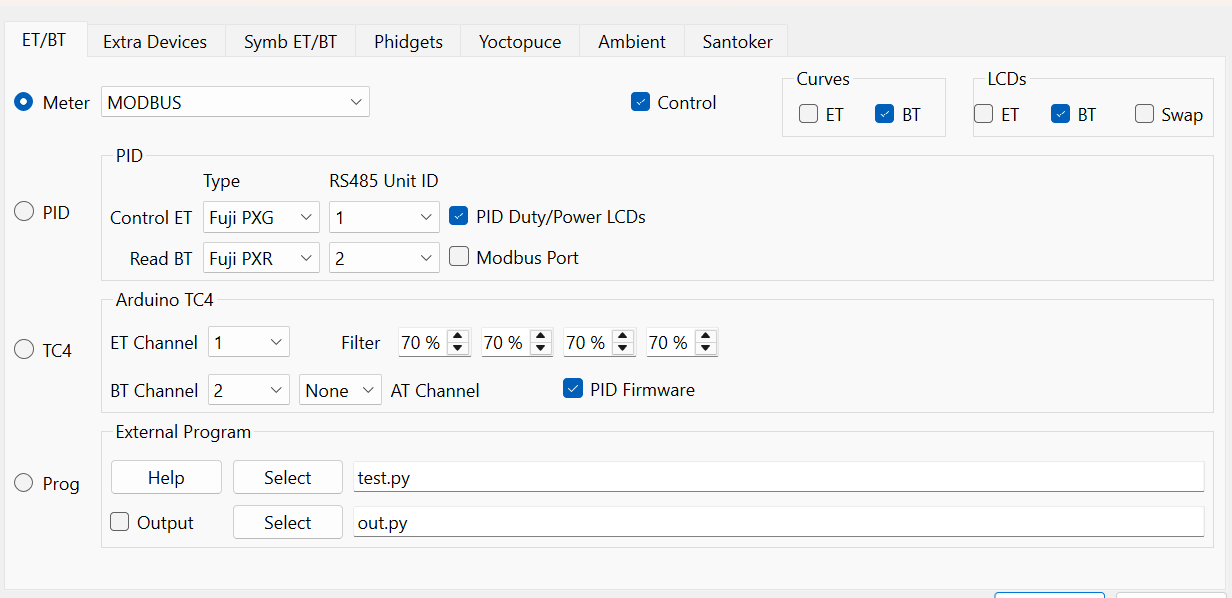
Under Config>Device set the following parameters
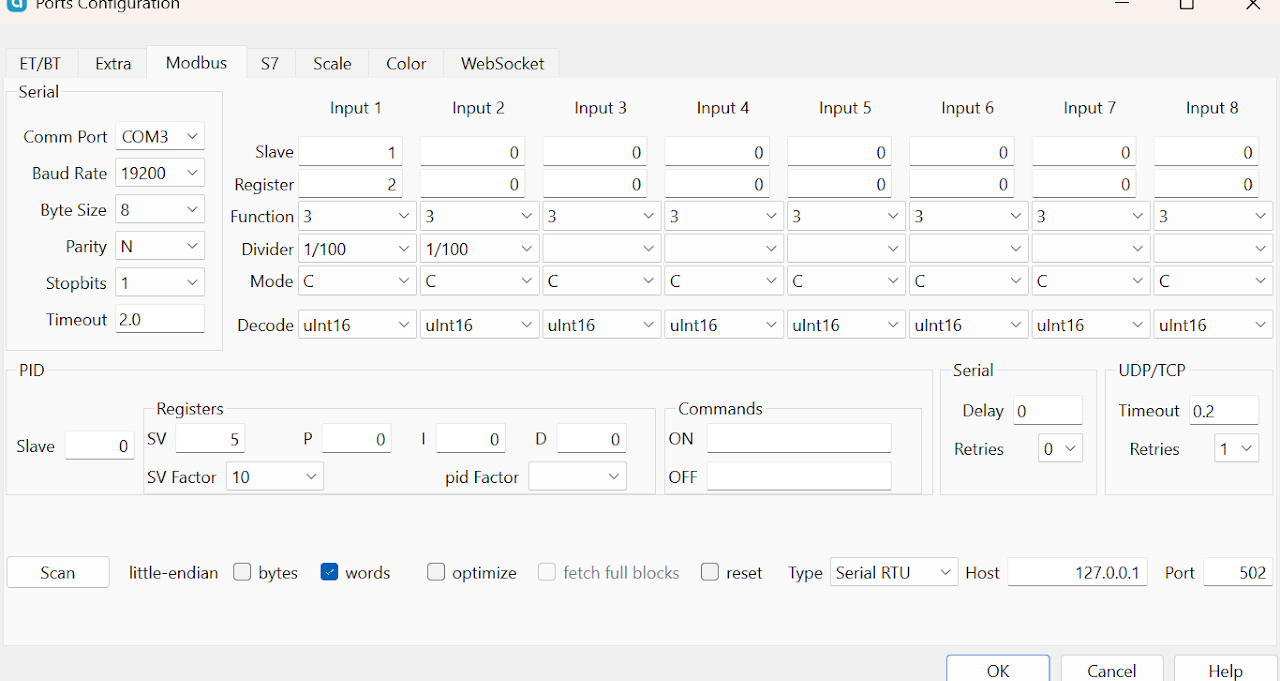
Under Config>Ports set the following parameters
For any questions, feel free to email me.